
Note
You can run this notebook on Google Colab.
Optimisation with firedrake-adjoint
This example is modified from the equivalent dolfin-adjoint demo
In this example, we will look at how to use firedrake-adjoint to optimise for strong (Dirichlet) conditions in a steady problem. firedrake-adjoint is a thin compatibility layer for the dolfin-adjoint package, a python package to automatically derive the discrete adjoint and tangent linear models of forward problems written using Firedrake.
As usual, we begin with some notebook magic (so that plots appear nicely) and importing Firedrake.
[1]:
import matplotlib.pyplot as plt
[2]:
from firedrake import *
The next step is new, we now import the firedrake.adjoint package, which exposes the various names useful in inverse problems.
[3]:
from firedrake.adjoint import *
We need to start taping (annotating) the Firedrake operations we run in order to be able to execute the adjoint.
[4]:
continue_annotation()
[4]:
True
Problem setup
Now we will set up the problem. We consider minimising the compliance:
subject to the Stokes equations
and Dirichlet conditions
Here, \(u\) and \(p\) are unknown velocity and pressure, \(f\) is a prescribed inflow, \(g\) is the control variable that we will optimise for and \(\alpha\) is a regularisation parameter. This corresponds physically to minimising the loss of energy as heat by controlling the in/outflow on \(\Gamma_\text{circ}\). The regularisation parameter penalises large control values.
This problem setup requires a mesh that is more complex than the built in ones Firedrake provides. Instead, it was created with Gmsh. It is loaded by using the Mesh constructor, passing the filename of the mesh in question.
[5]:
import os
if not os.path.isfile("stokes-control.msh"):
    # If the mesh is not available locally, we download it.
    !curl -O https://raw.githubusercontent.com/firedrakeproject/notebooks/refs/heads/main/stokes-control.msh
mesh = Mesh("stokes-control.msh")
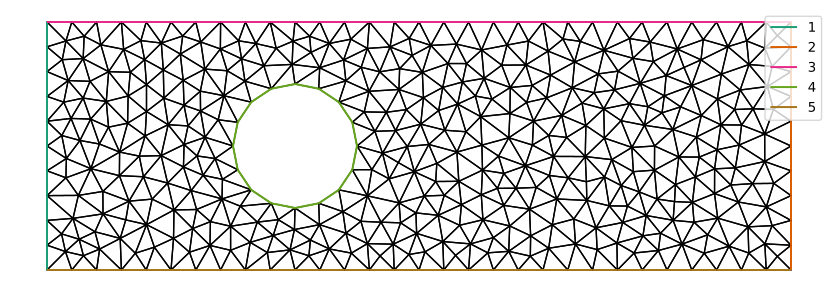
Now we’ll take a look at the mesh. Since we will need to know which mesh markers correspond to which parts of the boundary, we’ve added a legend to the plot. Normally you will know this because you told your mesh generator how to mark the boundaries.
[6]:
from firedrake.pyplot import quiver, streamplot, tricontourf, triplot

fig, axes = plt.subplots()
triplot(mesh, axes=axes)
axes.axis("off")
axes.set_aspect("equal")
axes.legend(loc="upper right");
The forward problem
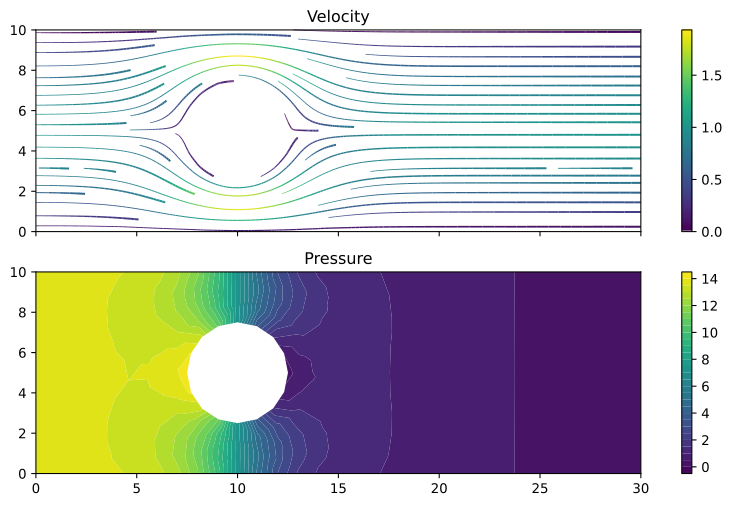
The forward problem should be familiar by now, we create a mixed function space for \(u\) and \(p\) and set up trial and test functions. We specify a parabolic velocity at the inflow, and no-slip (zero velocity) conditions on the side walls. The zero-pressure outflow condition is enforced weakly.
Our variational formulation for Stokes reads as follows. Find \((u, p) \in V\times Q\) such that:
[7]:
V = VectorFunctionSpace(mesh, "Lagrange", 2)
Q = FunctionSpace(mesh, "Lagrange", 1)
W = V*Q

v, q = TestFunctions(W)
u, p = TrialFunctions(W)

nu = Constant(1)     # Viscosity coefficient

x, y = SpatialCoordinate(mesh)
u_inflow = as_vector([y*(10-y)/25.0, 0])

noslip = DirichletBC(W.sub(0), (0, 0), (3, 5))
inflow = DirichletBC(W.sub(0), u_inflow, 1)
static_bcs = [inflow, noslip]
The boundary value, \(g\), on the circle will be our control variable. To do this, we define a Function which will hold the boundary values, we then build a DirichletBC object as normal.
[8]:
g = Function(V, name="Control")
controlled_bcs = [DirichletBC(W.sub(0), g, 4)]
bcs = static_bcs + controlled_bcs
Now we define the bilinear and linear forms.
[9]:
a = nu*inner(grad(u), grad(v))*dx - inner(p, div(v))*dx - inner(q, div(u))*dx
L = Constant(0)*q*dx
Now let’s solve the forward problem so that firedrake-adjoint annotates it. We’ll also take a look at the solution.
[10]:
w = Function(W)
solve(a == L, w, bcs=bcs)
[10]:
Coefficient(WithGeometry(MixedFunctionSpace(FunctionSpace(<firedrake.mesh.MeshTopology object at 0x7f68c6b4c050>, VectorElement(FiniteElement('Lagrange', triangle, 2), dim=2), name=None), FunctionSpace(<firedrake.mesh.MeshTopology object at 0x7f68c6b4c050>, FiniteElement('Lagrange', triangle, 1), name=None), name='None_None'), MeshSequence((Mesh(VectorElement(FiniteElement('Lagrange', triangle, 1), dim=2), 1), Mesh(VectorElement(FiniteElement('Lagrange', triangle, 1), dim=2), 1)))), 11)
[11]:
u_init, p_init = w.subfunctions

fig, axes = plt.subplots(nrows=2, sharex=True, sharey=True)
streamlines = streamplot(u_init, resolution=1/3, seed=0, axes=axes[0])
fig.colorbar(streamlines, ax=axes[0], fraction=0.046)
axes[0].set_aspect("equal")
axes[0].set_title("Velocity")

contours = tricontourf(p_init, 30, axes=axes[1])
fig.colorbar(contours, ax=axes[1], fraction=0.046)
axes[1].set_aspect("equal")
axes[1].set_title("Pressure");
The optimisation problem
Now we come to the optimisation problem. We first define the functional we wish to minimise, this is done by assembling a form that produces a number. Then we specify a control variable, and produce a “reduced” functional (the evaluation of the functional at a given control value). We then minimise the functional, producing an optimised control value. See the dolfin-adjoint documentation for more details on reduced functionals.
[12]:
u, p = split(w)
alpha = Constant(10)

J = assemble(1./2*inner(grad(u), grad(u))*dx + alpha/2*inner(g, g)*ds(4))
m = Control(g)
Jhat = ReducedFunctional(J, m)
In order to see what is going on in the optimisation process, we can attach a progress bar class to the tape:
[13]:
get_working_tape().progress_bar = ProgressBar
[14]:
g_opt = minimize(Jhat)
Evaluating functional ▣▣▣▣▣▣▣▣▣▣▣▣▣▣▣▣▣▣▣▣▣▣▣▣▣▣▣▣▣▣▣▣▣▣▣▣▣▣▣▣▣▣▣▣▣▣▣▣▣▣ 14/14 [0:00:00]
Evaluating adjoint ▣▣▣▣▣▣▣▣▣▣▣▣▣▣▣▣▣▣▣▣▣▣▣▣▣▣▣▣▣▣▣▣▣▣▣▣▣▣▣▣▣▣▣▣▣▣▣▣▣▣ 14/14 [0:00:02]
Evaluating functional ▣▣▣▣▣▣▣▣▣▣▣▣▣▣▣▣▣▣▣▣▣▣▣▣▣▣▣▣▣▣▣▣▣▣▣▣▣▣▣▣▣▣▣▣▣▣▣▣▣▣ 14/14 [0:00:00]
Evaluating adjoint ▣▣▣▣▣▣▣▣▣▣▣▣▣▣▣▣▣▣▣▣▣▣▣▣▣▣▣▣▣▣▣▣▣▣▣▣▣▣▣▣▣▣▣▣▣▣▣▣▣▣ 14/14 [0:00:00]
Evaluating functional ▣▣▣▣▣▣▣▣▣▣▣▣▣▣▣▣▣▣▣▣▣▣▣▣▣▣▣▣▣▣▣▣▣▣▣▣▣▣▣▣▣▣▣▣▣▣▣▣▣▣ 14/14 [0:00:00]
Evaluating adjoint ▣▣▣▣▣▣▣▣▣▣▣▣▣▣▣▣▣▣▣▣▣▣▣▣▣▣▣▣▣▣▣▣▣▣▣▣▣▣▣▣▣▣▣▣▣▣▣▣▣▣ 14/14 [0:00:00]
Evaluating functional ▣▣▣▣▣▣▣▣▣▣▣▣▣▣▣▣▣▣▣▣▣▣▣▣▣▣▣▣▣▣▣▣▣▣▣▣▣▣▣▣▣▣▣▣▣▣▣▣▣▣ 14/14 [0:00:00]
Evaluating adjoint ▣▣▣▣▣▣▣▣▣▣▣▣▣▣▣▣▣▣▣▣▣▣▣▣▣▣▣▣▣▣▣▣▣▣▣▣▣▣▣▣▣▣▣▣▣▣▣▣▣▣ 14/14 [0:00:00]
Evaluating functional ▣▣▣▣▣▣▣▣▣▣▣▣▣▣▣▣▣▣▣▣▣▣▣▣▣▣▣▣▣▣▣▣▣▣▣▣▣▣▣▣▣▣▣▣▣▣▣▣▣▣ 14/14 [0:00:00]
Evaluating adjoint ▣▣▣▣▣▣▣▣▣▣▣▣▣▣▣▣▣▣▣▣▣▣▣▣▣▣▣▣▣▣▣▣▣▣▣▣▣▣▣▣▣▣▣▣▣▣▣▣▣▣ 14/14 [0:00:00]
Evaluating functional ▣▣▣▣▣▣▣▣▣▣▣▣▣▣▣▣▣▣▣▣▣▣▣▣▣▣▣▣▣▣▣▣▣▣▣▣▣▣▣▣▣▣▣▣▣▣▣▣▣▣ 14/14 [0:00:00]
Evaluating adjoint ▣▣▣▣▣▣▣▣▣▣▣▣▣▣▣▣▣▣▣▣▣▣▣▣▣▣▣▣▣▣▣▣▣▣▣▣▣▣▣▣▣▣▣▣▣▣▣▣▣▣ 14/14 [0:00:00]
Evaluating functional ▣▣▣▣▣▣▣▣▣▣▣▣▣▣▣▣▣▣▣▣▣▣▣▣▣▣▣▣▣▣▣▣▣▣▣▣▣▣▣▣▣▣▣▣▣▣▣▣▣▣ 14/14 [0:00:00]
Evaluating adjoint ▣▣▣▣▣▣▣▣▣▣▣▣▣▣▣▣▣▣▣▣▣▣▣▣▣▣▣▣▣▣▣▣▣▣▣▣▣▣▣▣▣▣▣▣▣▣▣▣▣▣ 14/14 [0:00:00]
Evaluating functional ▣▣▣▣▣▣▣▣▣▣▣▣▣▣▣▣▣▣▣▣▣▣▣▣▣▣▣▣▣▣▣▣▣▣▣▣▣▣▣▣▣▣▣▣▣▣▣▣▣▣ 14/14 [0:00:00]
Evaluating adjoint ▣▣▣▣▣▣▣▣▣▣▣▣▣▣▣▣▣▣▣▣▣▣▣▣▣▣▣▣▣▣▣▣▣▣▣▣▣▣▣▣▣▣▣▣▣▣▣▣▣▣ 14/14 [0:00:00]
Evaluating functional ▣▣▣▣▣▣▣▣▣▣▣▣▣▣▣▣▣▣▣▣▣▣▣▣▣▣▣▣▣▣▣▣▣▣▣▣▣▣▣▣▣▣▣▣▣▣▣▣▣▣ 14/14 [0:00:00]
Evaluating adjoint ▣▣▣▣▣▣▣▣▣▣▣▣▣▣▣▣▣▣▣▣▣▣▣▣▣▣▣▣▣▣▣▣▣▣▣▣▣▣▣▣▣▣▣▣▣▣▣▣▣▣ 14/14 [0:00:00]
Evaluating functional ▣▣▣▣▣▣▣▣▣▣▣▣▣▣▣▣▣▣▣▣▣▣▣▣▣▣▣▣▣▣▣▣▣▣▣▣▣▣▣▣▣▣▣▣▣▣▣▣▣▣ 14/14 [0:00:00]
Evaluating adjoint ▣▣▣▣▣▣▣▣▣▣▣▣▣▣▣▣▣▣▣▣▣▣▣▣▣▣▣▣▣▣▣▣▣▣▣▣▣▣▣▣▣▣▣▣▣▣▣▣▣▣ 14/14 [0:00:00]
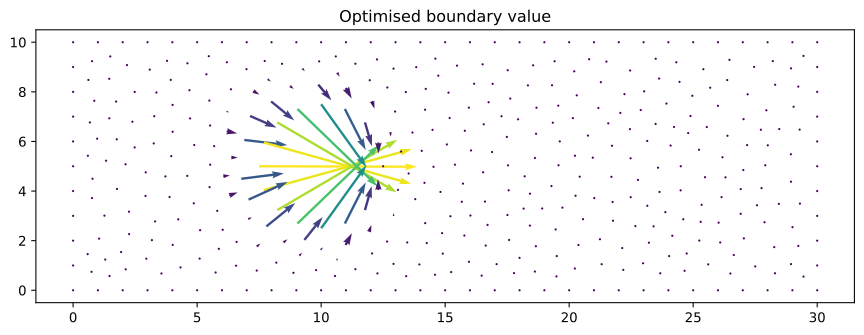
Now let’s take a look at the optimised control. The initial boundary condition on the circle was no slip. We see now that the optimised boundary condition has a significant outflow in the hole.
[15]:
fig, axes = plt.subplots()
arrows = quiver(g_opt, axes=axes, scale=3)
axes.set_aspect("equal")
axes.set_title("Optimised boundary value");
Let’s compare the difference in the initial and final values of the functional. This is done by calling the ReducedFunctional object with the control at the requested value.
[16]:
print("Jhat(g) = %.8g\nJhat(g_opt) = %.8g" % (Jhat(g), Jhat(g_opt)))
Evaluating functional ▣▣▣▣▣▣▣▣▣▣▣▣▣▣▣▣▣▣▣▣▣▣▣▣▣▣▣▣▣▣▣▣▣▣▣▣▣▣▣▣▣▣▣▣▣▣▣▣▣▣ 15/15 [0:00:00]
Evaluating functional ▣▣▣▣▣▣▣▣▣▣▣▣▣▣▣▣▣▣▣▣▣▣▣▣▣▣▣▣▣▣▣▣▣▣▣▣▣▣▣▣▣▣▣▣▣▣▣▣▣▣ 15/15 [0:00:00]
Jhat(g) = 46.078212
Jhat(g_opt) = 19.896719
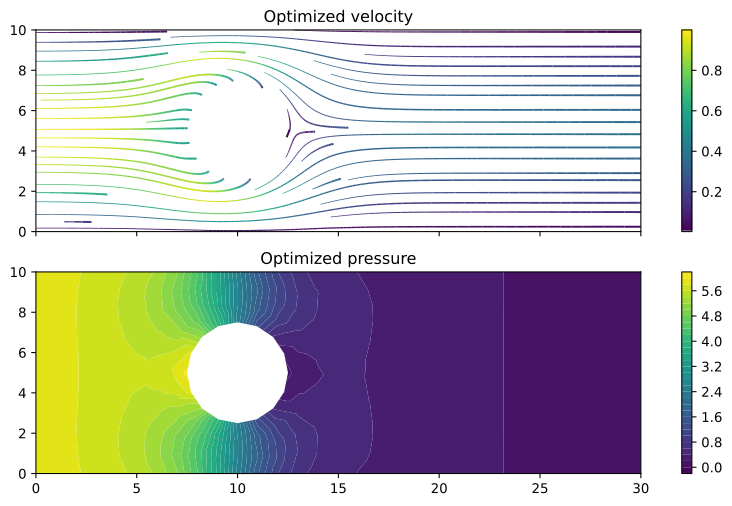
To see the optimised flow field, we solve the same problem again, only with the new (optimised) value for the boundary data on \(\Gamma_\text{circ}\). This time we’re not interested in annotating the solve, so we tell firedrake-adjoint to ignore it by passing annotate=False.
[17]:
g.assign(g_opt)
w_opt = Function(W)
solve(a == L, w_opt, bcs=bcs, annotate=False)
[17]:
Coefficient(WithGeometry(MixedFunctionSpace(FunctionSpace(<firedrake.mesh.MeshTopology object at 0x7f68c6b4c050>, VectorElement(FiniteElement('Lagrange', triangle, 2), dim=2), name=None), FunctionSpace(<firedrake.mesh.MeshTopology object at 0x7f68c6b4c050>, FiniteElement('Lagrange', triangle, 1), name=None), name='None_None'), MeshSequence((Mesh(VectorElement(FiniteElement('Lagrange', triangle, 1), dim=2), 1), Mesh(VectorElement(FiniteElement('Lagrange', triangle, 1), dim=2), 1)))), 1306)
[18]:
u_opt, p_opt = w_opt.subfunctions

fig, axes = plt.subplots(nrows=2, sharex=True, sharey=True)
streamlines = streamplot(u_opt, resolution=1/3, seed=0, axes=axes[0])
fig.colorbar(streamlines, ax=axes[0], fraction=0.046)
axes[0].set_aspect("equal")
axes[0].set_title("Optimized velocity")

contours = tricontourf(p_opt, 30, axes=axes[1])
fig.colorbar(contours, ax=axes[1], fraction=0.046)
axes[1].set_aspect("equal")
axes[1].set_title("Optimized pressure");
Now that we are done optimising this problem, and so that the recorded annotations do not leak into the exercise, we tell firedrake-adjoint to forget all of the entries on its tape.
[19]:
tape = get_working_tape()
tape.clear_tape()
Exercise:
Go back to the start of the notebook and consider a different inflow velocity. For example, try
How does it affect the solution before and after optimisation?
[ ]: